
If your company needs additional time to submit its income tax return, you may be able to apply for e-Lanjutan Masa (e-EOT) through MyTax.
Starting from 1 November 2025, taxpayers can apply for an extension of time to submit their income tax return through the e-Lanjutan Masa application in MyTax. The application can be made by the company director, organisation administrator, or an authorised representative acting on behalf of the company.
This guide explains how to apply for e-Lanjutan Masa via MyTax, who can apply, what information is required, and important points to consider before submitting the application.
What is e-Lanjutan Masa?
e-Lanjutan Masa is an online facility provided by Lembaga Hasil Dalam Negeri Malaysia (HASiL/LHDN) that allows eligible taxpayers to apply for an extension of time to submit their income tax return.
Previously, applications for extension of time were generally handled through manual procedures. Under the new system, eligible taxpayers can submit the application electronically through the MyTax portal.
HASiL states that applications are processed automatically in real time, subject to the applicable eligibility criteria, and the application status can be checked online.
Who Can Apply for e-Lanjutan Masa?
The e-Lanjutan Masa facility is available for selected categories of taxpayers, including:
- Companies – Form C
- Co-operative societies – Form C1
- Limited Liability Partnerships (LLP) – Form PT
- Trust bodies – Forms TA, TC, TR and TN
- Petroleum taxpayers – Forms CPP and CPE
For companies, the application can be accessed through the appropriate MyTax role, such as Director / Organisation Administrator, or an authorised representative where applicable.
How to Apply for e-Lanjutan Masa via MyTax
The following is the general process for submitting an e-Lanjutan Masa application through MyTax.
Step 1: Log in to MyTax
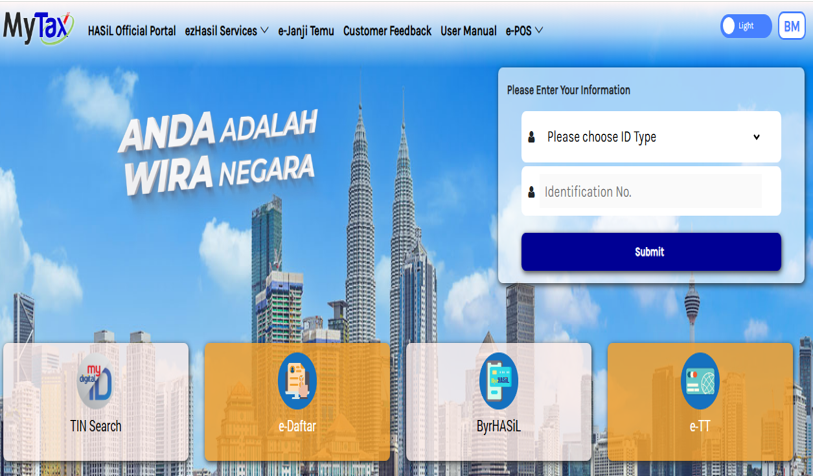
First, access the official MyTax portal.
Log in using your MyTax account.
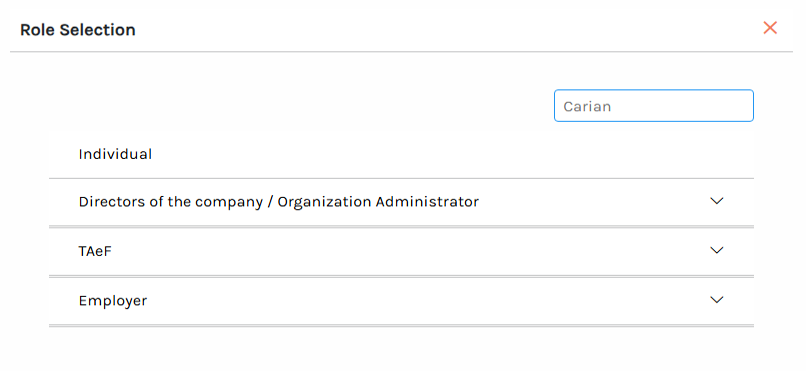
For a company, make sure you select the appropriate role, such as:
Director / Organisation Administrator / Authorised Representative
The availability of the relevant role and functions will depend on the taxpayer’s MyTax access and authorisation.
Step 2: Go to ezHasil Services
After logging in:
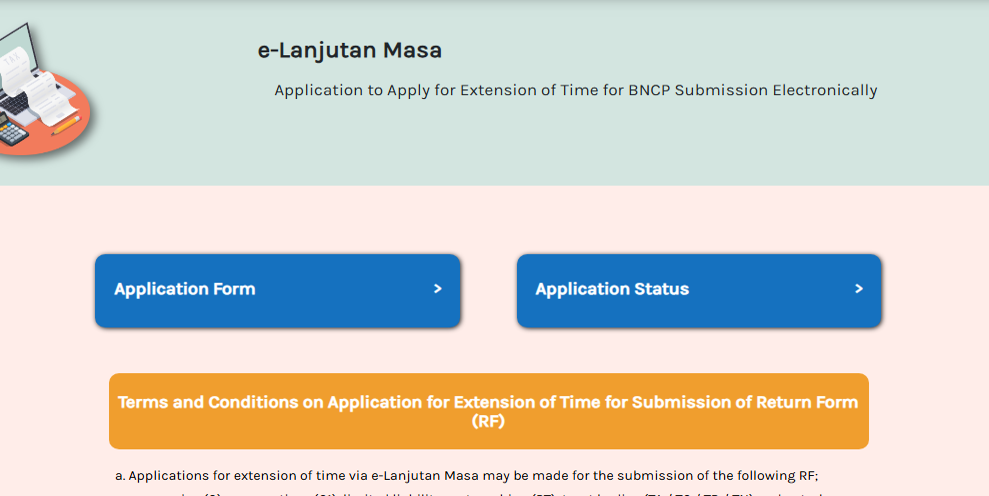
MyTax → ezHasil Services → e-Lanjutan Masa
The e-Lanjutan Masa application is located under the ezHasil services available through MyTax. HASiL’s published information specifically directs taxpayers to:
Login → ezHasil Services → e-Lanjutan Masa.

Step 3: Select the Relevant Application Form
Step 4: Fill in the Application Form
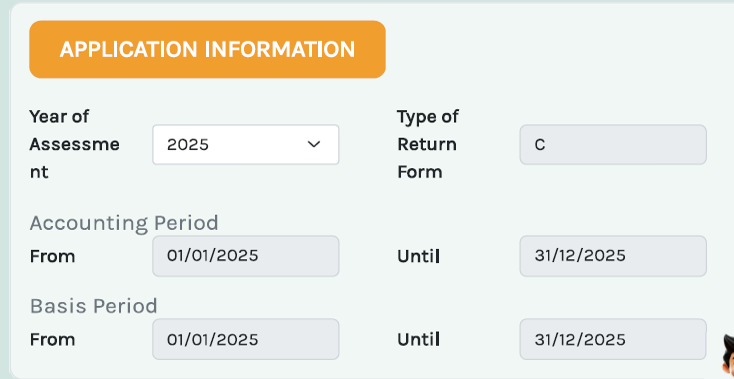
Select the relevant taxpayer/company and the applicable Year of Assessment (YA).
Jenis Borang (Type of Return Form) : C
Input:
- Tempoh Perakaunan (Accounting Period)
- Tempoh Asas (Basis Period)
Step 5: Fill in the Application Form
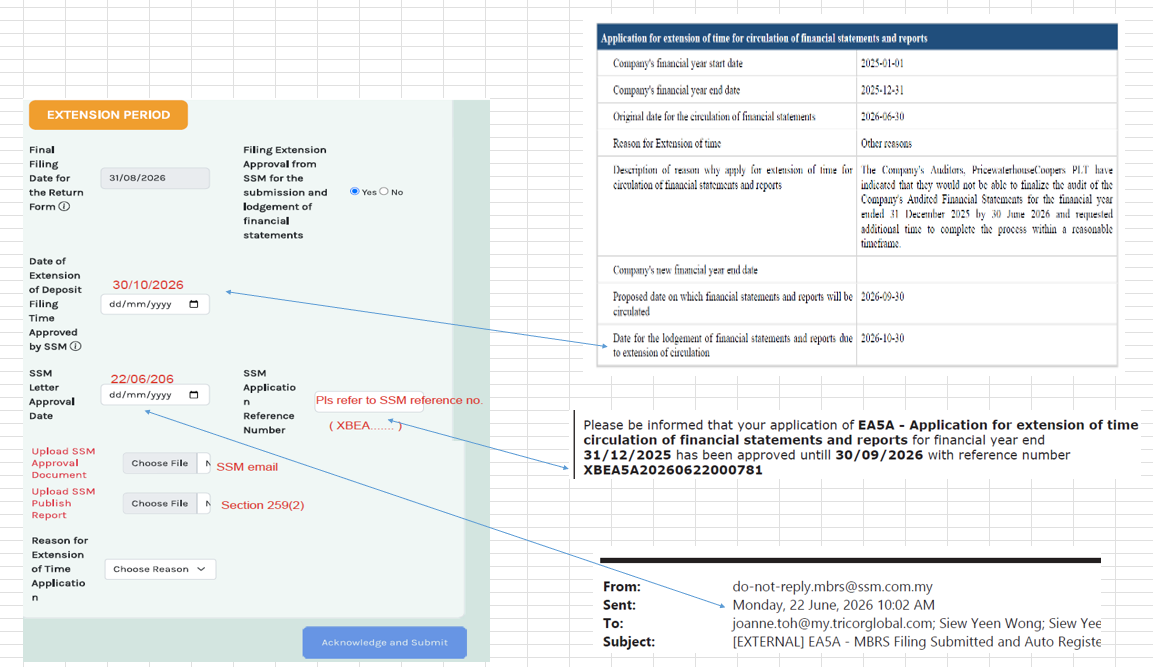
Step 6: Select the Reason for Extension & Upload Document as
The application will require the taxpayer to provide the applicable reason for requesting additional time.
One important category recognised under the HASiL guidelines is where the taxpayer has obtained an extension of time from Suruhanjaya Syarikat Malaysia (SSM) for lodging its financial statements.
Select “Get EOT from SSM”
HASiL’s e-Lanjutan Masa guidelines provide specific eligibility conditions for applications based on an SSM-approved extension. For example, the information relating to the accounting period must correspond with HASiL’s records, and certain existing applications or approvals must not already be pending or processed for the same Year of Assessment.
Therefore, taxpayers should not simply select a reason without checking whether they meet the relevant criteria.
Step 7: Upload Supporting Documents, Where Required
If supporting documents are required, upload the relevant documents through the application.
For example, where the application is based on an extension granted by SSM, the relevant SSM approval documentation should be available to support the application.
This is particularly important because the e-Lanjutan Masa application is subject to eligibility conditions.
Tip: Keep a copy of all supporting documents and the SSM approval for your company’s tax records.
Step 8: Review the Application
Before submitting the application, carefully review:
- Company name;
- Income Tax Number;
- Year of Assessment;
- Accounting period;
- Original filing deadline;
- Reason for extension;
- Requested extension period; and
- Supporting documents.
A mistake in the accounting period or other taxpayer information may affect the application.
Step 9: Submit the e-Lanjutan Masa Application
After confirming that all information is correct, submit the application through MyTax.
The system will process the application based on the applicable eligibility criteria.
HASiL has stated that e-Lanjutan Masa applications are processed automatically and in real time, subject to the relevant criteria.
Step 10: Check the Application Status
After submission, check the application status through MyTax.
Do not assume that the filing deadline has been extended merely because an application has been submitted.
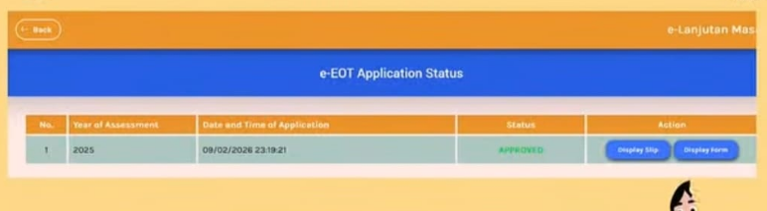
The taxpayer should confirm that the application has been approved and retain the approval record for future reference.
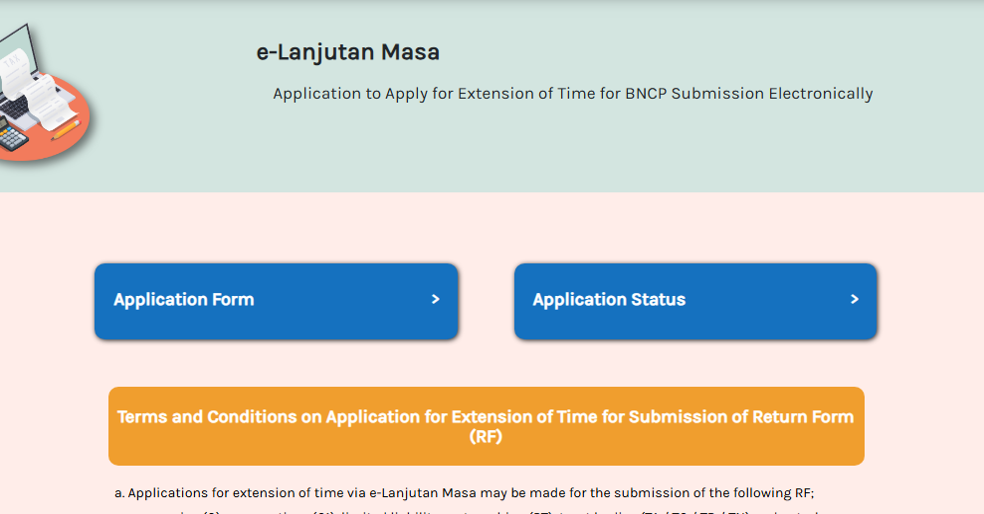
Click on Application Status:
Status appear on screen:
Important Eligibility Conditions for e-Lanjutan Masa
Not every application for extension of time will automatically qualify.
HASiL’s guidelines state that approval is subject to specific eligibility requirements. In particular, applications based on an SSM-approved extension have conditions relating to:
- Whether HASiL has already received the income tax return for the relevant YA;
- Whether the accounting period and basis period correspond with HASiL’s records;
- Whether there is an existing manual extension application that has been rejected, approved or is pending;
- Whether a previous e-Lanjutan Masa approval falls within the permitted circumstances; and
- Whether the application is submitted within the prescribed period.
Therefore, e-Lanjutan Masa should not be viewed as an automatic right to obtain additional filing time.
The application remains subject to HASiL’s rules and eligibility requirements.
What Happens If the e-Lanjutan Masa Application Is Approved?
If the application is approved, the taxpayer should retain the approval confirmation and comply with the new approved filing deadline.
The extension relates to the submission of the relevant income tax return. It does not mean that the taxpayer can disregard other tax obligations.
For example, companies should continue to monitor their:
- tax instalment payments;
- outstanding tax liabilities;
- tax estimates;
- tax computations;
- MITRS submission requirements, where applicable; and
- other statutory compliance deadlines.
An extension of time for filing the tax return should not be confused with an extension of time for payment of tax.
What If the e-Lanjutan Masa Application Is Rejected?
If an application is rejected, the taxpayer should immediately review the reason for rejection and determine whether the original filing deadline is approaching or has already passed.
Do not wait until the last minute to apply.
Where the company is unable to obtain an extension, it should consider submitting the income tax return as soon as possible to minimise potential compliance consequences.
Common Mistakes When Applying for e-Lanjutan Masa
1. Applying too late
One of the most common mistakes is waiting until the filing deadline is almost due before making the application.
The e-Lanjutan Masa guidelines prescribe specific application periods and eligibility conditions.
2. Incorrect accounting period
The accounting period entered in the application should correspond with HASiL’s records.
A mismatch may affect eligibility.
3. Assuming SSM extension automatically means LHDN extension
An extension granted by SSM and an extension granted by HASiL are two separate matters.
An SSM extension may form the basis for an e-Lanjutan Masa application, but the taxpayer still needs to apply through the appropriate HASiL process and satisfy the applicable criteria.
4. Failing to retain the approval
Once the application is approved, save the approval confirmation and supporting documents.
Your tax agent or accounting team may need the record when completing the company’s tax filing.
5. Confusing extension of filing with extension of tax payment
An extension of time to submit the income tax return does not automatically mean that all tax payment obligations are extended.
Companies should continue monitoring their tax payment obligations separately.
e-Lanjutan Masa MyTax – Frequently Asked Questions
Is e-Lanjutan Masa available through MyTax?
Yes. HASiL introduced the online e-Lanjutan Masa facility through MyTax from 1 November 2025.
Can a company apply for e-Lanjutan Masa for Form C?
Yes. Companies are among the taxpayer categories covered by the e-Lanjutan Masa facility.
Can a tax agent apply for e-Lanjutan Masa on behalf of a company?
The application can be made through the relevant authorised MyTax role, including an authorised representative where the appropriate access and authorisation are available.
Is e-Lanjutan Masa automatically approved?
No. Applications are subject to the eligibility criteria prescribed by HASiL.
Although the system provides automatic/real-time processing for eligible applications, approval should not be assumed simply because an application has been submitted.
Do I still need to file the tax return if I have applied for an extension?
Yes. An extension is not a replacement for the income tax return. If the extension is approved, the taxpayer must submit the relevant return within the new approved deadline.
Is an SSM extension the same as an LHDN extension?
No. They are separate regulatory requirements.
An SSM extension may be relevant to an e-Lanjutan Masa application under the applicable HASiL criteria, but the taxpayer should still obtain confirmation of the HASiL extension through MyTax
Conclusion
The introduction of e-Lanjutan Masa through MyTax makes the application for additional time to submit certain income tax returns more convenient for Malaysian taxpayers.
However, taxpayers should not assume that every application will automatically be approved. The application is subject to HASiL’s eligibility requirements, and the information submitted should match the taxpayer’s records.
For companies, it is particularly important to coordinate the SSM financial statement filing timeline, tax return filing deadline and e-Lanjutan Masa application so that the different compliance deadlines do not conflict.
If you are unsure whether your company qualifies for e-Lanjutan Masa or need assistance with the application and corporate tax filing, it is advisable to consult a licensed Malaysian tax agent before the original filing deadline.
Official reference: Lembaga Hasil Dalam Negeri Malaysia (HASiL), Garis Panduan Operasi Bil. 4 Tahun 2025 – Prosedur Permohonan dan Kelulusan Lanjutan Masa Pengemukaan Borang Nyata Secara Dalam Talian (e-Lanjutan Masa).
About the Author
This article is prepared and professionally reviewed by Pang Cheng Leong , a Malaysian Chartered Accountant, Chartered Tax Practitioner, Licensed Tax Agent and Licensed Company Secretary, with professional experience in accounting, taxation, Audit and corporate compliance.
Professional affiliations: CPA (Australia), CPA (Malaysia), ASEAN CPA), ACTIM
He is the Founder and Managing Director of CLPC Advisors, a Malaysian Accounting, Tax and Corporate Advisory firm providing accounting, tax, advisory and corporate secretarial services to businesses in Malaysia.
Last reviewed: August 2026
This article is provided for general information and educational purposes only. It should not be treated as legal or professional advice for a specific company or situation. Regulatory requirements and interpretations may change, and readers should obtain appropriate professional advice based on their specific circumstances.
Important: Tax laws, HASiL procedures and MyTax functions may be updated from time to time. Readers should refer to the latest official HASiL guidelines and announcements before relying on this information.
Official Reference
The information in this article is based principally on guidance and information published by Lembaga Hasil Dalam Negeri Malaysia (HASiL) concerning the e-Lanjutan Masa facility.
For the latest requirements, taxpayers should refer to the official HASiL guidance and MyTax portal.